
Google has expanded the About This Result panel to provide users with more information about why individual results are shown for the query they typed in. Google announced the update to the panel last week, saying it provides “a quick and easy way to see useful context about how Google returned results for your query, and to find helpful tips to get more out of Google Search.”
As Google says, the panel is designed to help users get the best results from Google Search by understanding how its algorithm matches content to queries. However, the feature also offers search marketers some useful insights into the signals triggering specific results.
What does the new ‘About This Result’ panel look like?
Back in February, Google rolled out the About This Result panel, which users can access by clicking the three dots that appear at the top-right of results listings in Google Search.
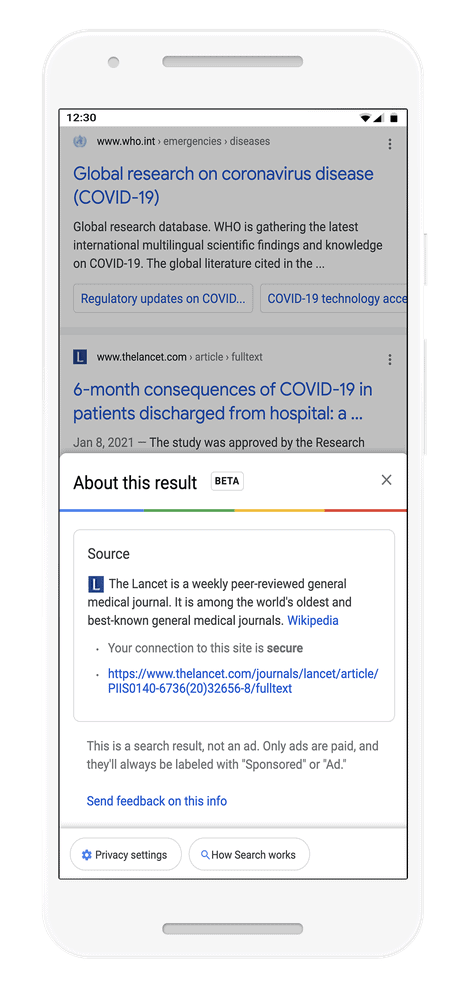
However, the initial version of the feature didn’t provide much contextual information about the results. Now, Google has expanded the panel to explain why individual results have been matched to user queries, including the keywords, related terms and how location settings impact the search results.
In the new About This Result panel, any of the following information may appear:
- Matching keywords: A simple, but important, factor Google uses to determine if information is relevant is when a webpage contains the same keywords as your search.
- Related terms: Google also looks for terms that our systems determined are related to the words in your query. If you search “how to cook fish in the oven,” we’ll also look for pages that have related terms like “bake” and “recipe.”
- Looking at links: When other pages link to a page using similar words as your query, that page might be relevant to your search. It can also be a helpful indicator of whether online content creators tend to regard the page as useful for that topic.
- Local relevance: Our systems also look at factors like the language you’re using to search as well as your country and location, to deliver content relevant for your area. For example, if you search “what day is trash pickup?” then it’s helpful to get results that are applicable to your city or state.
Google hasn’t yet specified whether this is the only information that can appear or whether other signals may be included for some results. However, the search giant has offered up some examples of the new About This Result panel to show us what this looks like in the wild.
Examples of the new ‘About This Result’ panel
In the example below, a user has typed in “how to cook fish in the oven” into Google and clicked the three dots at the top-right of one result to find out why it’s showing for their search.
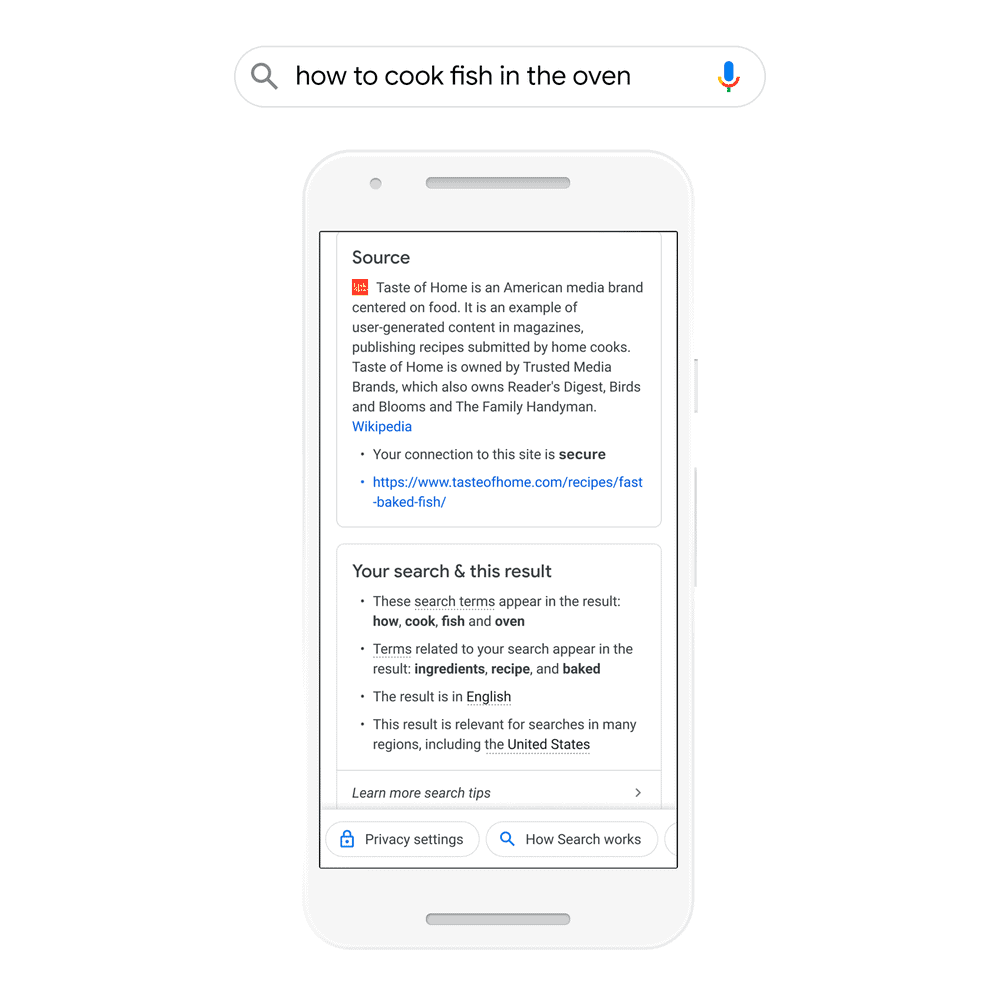
Under the “Your search & this result” tab, Google shows the user which search terms appear in the result they’ve clicked on, the related search terms that were considered in its ranking and its relevance to location settings.
While this feature is designed for search users, marketers can also use it to understand how keywords, related terms and other factors are linked to specific search results.
While the information provided in these panels is quite basic, Google confirms that the most important ranking signals often are quite straightforward:
“The way Google determines what is relevant and reliable information for a given query is based on a lot of different factors. While it can seem complex, some of these fundamental concepts are actually quite simple, and can be useful for people to understand when they start searching.” – Elizabeth Tucker, Product Manager at Google Search.
In the next example, we can see how Google’s algorithm is capable of matching the query “get the shot” to local results for Covid-19 vaccination.

Once again, we can see the search terms linked to the result and the related terms “getting” and “vaccine,” which Google has used to improve the relevancy of the result. Without users even typing in phrases specific to Covid-19 or vaccination, we can see how Google’s algorithm is able to interpret the meaning of this user’s query and match it to results providing local information in their area (Vermont).
We also see a new bullet point in the list specifying that “other websites with your search terms link to this results,” which confirms one of the key roles inbound links play in the ranking of web pages.
Users can also interact with the panel to get tips on how to change the results they receive, such as changing the language settings or using specific keywords to alter the results.

Again, this is all designed to help search users get the most relevant results from their searches but marketers can also use the tool to gain more insights about their most important keywords and pages. For example, you might check the top-ranking competitor pages for your primary keywords to see which ranking signals are highlighted. Likewise, you could check your own pages that are ranking for the wrong keywords or pages that are ranking above your intended page for certain keywords.
Another scenario where this might be useful is learning more about longtail keywords, especially ones that Google has had trouble interpreting in the past – or continues to do so. The search giant recently announced a new technology that drastically improves its ability to interpret tricky queries and match content to them, which opens up a world of new longtail keyword opportunities the search engine struggled to deliver relevant content for in the past.
This opens up new opportunities for search marketers and the new About This Result panel can help marketers pinpoint which queries Google is capable of matching with relevant content and which signals are prioritised.