
Google has introduced a new way for users to find things on the web, even when they don’t know how to describe what they’re looking for. The new multisearch feature is being added to Google Lens, the search giant’s image recognition app that turns users’ smartphones into an intelligent visual analysis tool.
With multisearch, users can use text and images to find things on the web, even when they don’t know how to describe what they’re seeing.
What is multisearch & how can you use it?
Mulitsearch opens up an entirely new way for people to find things online and it solves one of the biggest problems users face when they turn to search engines like Google. Finding things online when you know what you’re looking for but getting the right results when you don’t know the exact words to describe what you want is a challenge.
“How many times have you tried to find the perfect piece of clothing, a tutorial to recreate nail art or even instructions on how to take care of a plant someone gifted you — but you didn’t have all the words to describe what you were looking for?”
Google aims to solve this problem with mulitsearch by allowing users to add images to their searches. For example, someone might be looking for a specific item of kitchenware but they’re not sure what it’s called. With Google Lens, they can take a picture of the item in question and ask “what is this called?” or “where can I buy one of these?” and Google will identify the object for them.
Google teased this feature back in October 2021 when it promised a new search experience, powered by its latest AI technology, called Multitask Unified Model (MUM).
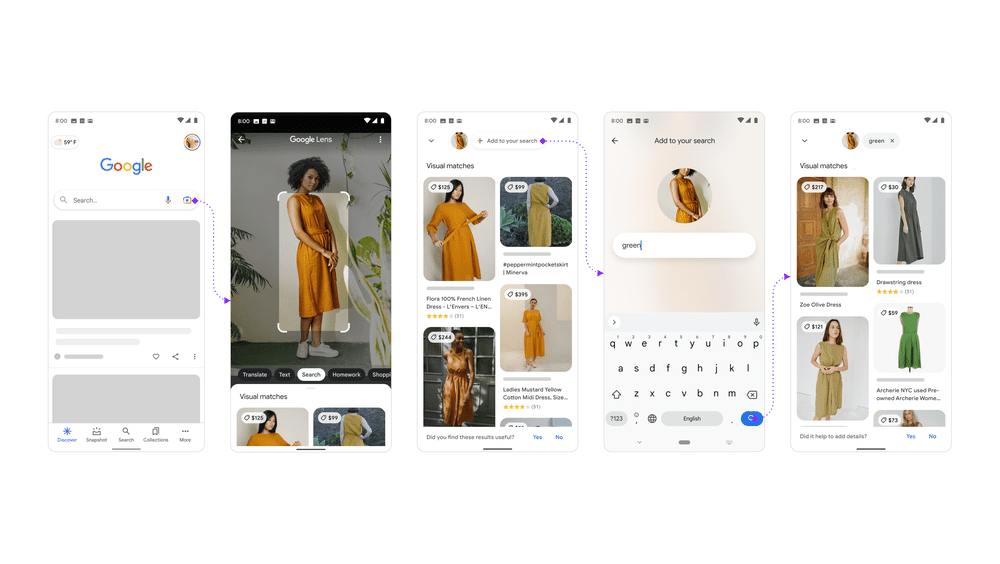
To use the new multisearch feature, you simply need the Google app installed on an Android or iOS device.
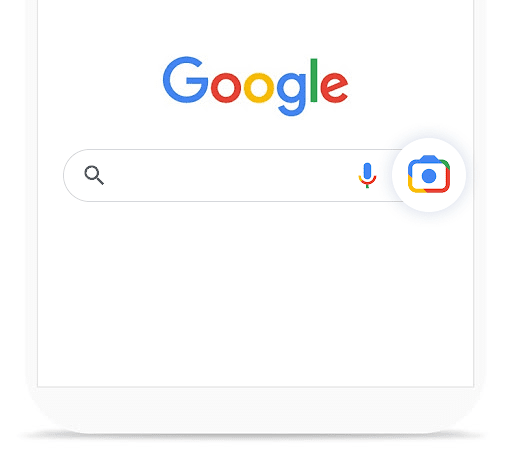
With the app installed, you can click on the Lens icon in the app itself or the Google Search widget on your device to open up the Lens interface, allowing you to search by capturing an image with your device’s camera or include images/screenshots you’ve already taken in your search.
For example, users can take a quick snap of the stylish wallpaper pattern at their local coffee shop. Then, swipe up and tap the “+ Add to your search” button to add text.
With multisearch, users can ask questions about the objects around them and refine their searches by colours, brands or visual attributes. Here are some examples Google offers up in its announcement for the new multisearch feature in Lens:
- Screenshot a stylish orange dress and add the query “green” to find it in another colour
- Snap a photo of your dining set and add the query “coffee table” to find a matching table
- Take a picture of your rosemary plant and add the query “care instructions”
Google says the lens feature currently works most effectively for shopping searches but the tool can also be used for a wide range of other functions, such as searching for historical figures using a picture and queries like “who is this?”.
The functionality will presumably improve as Google’s artificial intelligence system continues to develop and it compiles more data to work with.
“All this is made possible by our latest advancements in artificial intelligence, which is making it easier to understand the world around you in more natural and intuitive ways. We’re also exploring ways in which this feature might be enhanced by MUM– our latest AI model in Search– to improve results for all the questions you could imagine asking.”
This adds to the existing features of Google Lens, including image translation and copying text from handwritten or printed text. For more information on the new Google multisearch feature, you can read through the official announcement from Google and you can learn more about what else users can do with the Google app from this Keyword blog post.