
Quality Score is an important topic for any Google Ads advertiser but it can be a tricky one to get your head around as a newcomer. It doesn’t help that there’s a lot of vague information out there and even Google’s documentation doesn’t go into the kind of detail we’d like about such an important aspect of every advertising campaign.
In this episode of PPC Essentials, we’re going to give you the full picture on Quality Score and how you can use it to improve the performance of your Google Ads campaigns.
What is Quality Score in Google Ads?
Before we get into anything too heavy, let’s take a quick look at what Google has to say about Quality Score. The best place to start is probably with this Quality Score definition, which you’ll find on the Google Ads Help website:
“Quality score is an estimate of the quality of your ads, keywords and landing pages. Higher quality ads can lead to lower prices and better ad positions.”
As Google says, Quality Score aims to rate the quality of three key things: your ads, the keywords you’re targeting and the landing page you direct users to after they click on your ad. Elsewhere on Google Ads Help, you’ll also find a brief explanation about what you can actually use your Quality Score for:
“When you’re looking for insight into how relevant your landing page and ad are to the keywords that you’ve chosen, you can look at your Quality Score.”
In other words, a high Quality Score should mean your landing pages and ads are relevant to the keywords you’re bidding on and low Quality Scores mean you should probably look at improving these areas.
That’s a pretty concise and accurate summary of what your Quality Score is in Google Ads but it doesn’t tell the whole story. Quality Score is one of the most important performance indicators in Google Ads and your scores directly impact how much you need to pay for your ads to be shown for each keyword.
To make the most of Quality Scores in Google Ads, you need to know how they’re calculated, what they represent and how to improve them for better performance.
Why does Quality Score matter?
Quality Score is important because this is how Google determines the quality of your keywords and search ads. That’s important enough by itself but it also happens the factors Google users to calculate your scores are fundamental performance indicators for any Google Ads strategy.
Essentially, this means the higher your Quality Scores are, the better your overall PPC performance is going to be – albeit indirectly.
Quality Scores also have a direct impact on your Google Ads performance, though. Higher scores tell Google your ads are more likely to get clicks (this is where Google makes its money), which means you can actually bid lower on certain keywords and your ads will still show above competitors who have bid more than you – purely because your Quality Score is higher.
In other words, high Quality Scores directly make your ad campaigns less expensive while improving performance. This is a crucial strategy for optimising Google Ads accounts for the highest ROI and beating your competitors in Google Search.
How is your Quality Score calculated?
The best way to explain what Quality Score is in more detail is to look at how Google calculates it. This will help you understand precisely what it’s looking at when it calculates your scores and how the key elements involved affect each other.
Here are some of the factors Google looks at when it calculates your Quality Scores:
- Keyword click-through rate
- Ad click-through rate
- Historical click-through rate
- Keyword relevance
- Ad relevance
- Landing page relevance
- Landing page loading times
- Your account history
That’s not a comprehensive list (you’ll need a very well informed Google insider for one of those) but these are widely known factors that are considered in your Quality Score. So let’s take a look at each of these in a little more detail to make sure you understand the role they play and how they affect performance.
Keyword click-through rate
Click-through rate (CTR) is the number of times your ad is clicked vs the total number of times it’s shown to users. This is by far the biggest factor in your Quality Score because it essentially tells Google how successfully your ads deliver what people are searching for – pretty important for a search engine.
There are different types of CTR Google looks at, though, and the most important of these is your keyword click-through rate. This reflects how often a user clicks on all of your ads and ad campaigns for each specific keyword, the biggest indication that you’re providing what users are looking for.
Ad click-through rate
The next type of CTR Google looks at is the click-through rate for each specific ad. This helps Google understand how compelling your ads are on an individual basis, which is also a crucial metric for yourself when you’re tracking ad performance, testing new ad variations and optimising performance in general.
Historical click-through rate
When Google throws CTRs into its Quality Score calculations, it’s not actually using the same numbers you’ll see in your Google Ads dashboard. If you read the About Quality Score page on Google Ads Help, you’ll see Google specifically states that your “expected click-through rate” is used to calculate your scores.
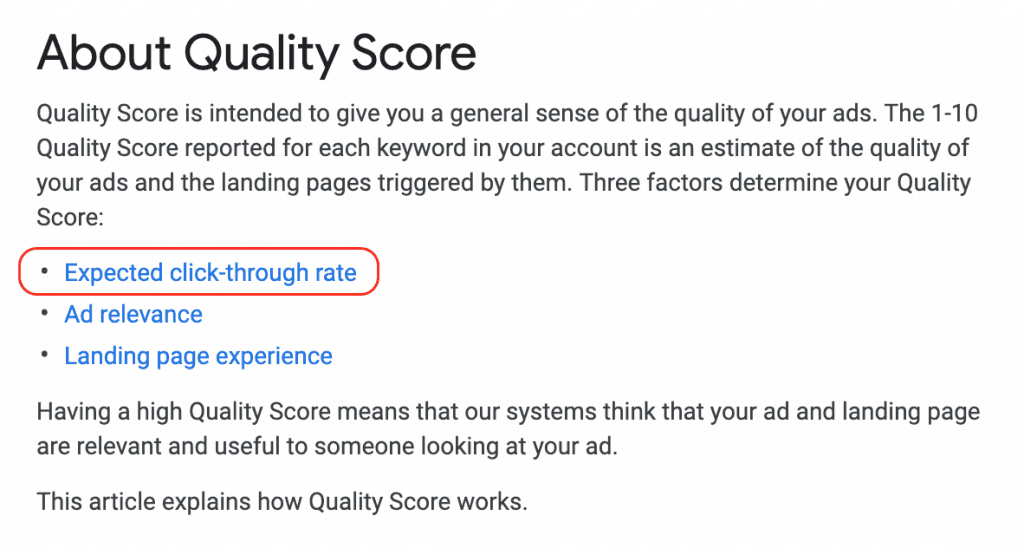
To calculate your CTRs at the keyword and ad level, Google looks at your historical CTRs and compares these to your competitors. This creates a bit of a blind spot as the numbers you see on your reports might not reflect the calculation Google uses to come up with your Quality Scores. Although you can look at your own historical CTR performance for a general idea of the figures Google is using, you can’t see your competitors’ historical CTRs.
Keyword relevance
Relevance is crucial to everything you do in PPC and click-through rates by themselves don’t tell Google how relevant your ads, landing pages and campaigns are. To get the full picture, Google looks at relevance in three key areas: keyword relevance, ad relevance and landing page relevance.
With keyword relevance, you need to create ad groups with highly specific themes. For example, an estate agent running a single ad group for the keywords “property rental” and “property for sale” could increase keyword relevance greatly by creating separate campaigns for each keyword and their related search terms.
The worst thing you can do is cram all of your keywords into a single ad group.
In an ideal world, you’ll want to create separate campaigns for every theme and then create ad groups for each specific keyword. For the highest possible relevance, you can create something called single keyword ad groups (SKAGs) which only target one search term and its closest variants.
This will give you a very high keyword relevance for this ad group but it’s not practical to create and manage SKAGs for every single keyword. Instead, you’ll want to create a mix of SKAGs for some of your best-performing keywords and then group highly relevant keywords together for the rest of your campaigns/ad groups.
Ad relevance
Next up, we have ad relevance and the concept is pretty single: the more relevant your ad is to user needs and the query they type in, the more clicks your ad is going to generate. This is another reason why keyword relevance is so important because a highly focused list of keywords will make it easier to match a users’ search query in your ad.
The most important element in your ad, in terms of relevance, is the title. Ideally, you want the same keyword users type in to appear in your title so users can instantly see you’re providing what they’re after.

You also want to match keywords in the text description of your ad as much as possible, too. Google will highlight these words in bold to help clarify that you can deliver what users want. Having these keywords in your ad copy not only tells Google that your ads are highly relevant to user searches, but also tell users the same thing – which means more clicks, higher CTRs and better Quality Score on two fronts.
Matching user keywords with single keyword ad groups is easy enough but things are a little trickier when it comes to ad groups with longer lists of keywords. To boost relevance in these situations, you’ll want to use negative keywords to stop your ads from showing for similar but irrelevant search terms and take a look at dynamic keyword insertion.
Dynamic keyword insertion automatically changes the copy in your ads to match the search terms typed in by a user and this feature means you can create ad groups with larger lists of keywords while keeping your ads relevant to each type of query they show for.
This doesn’t give you license to bang a whole bunch of keywords into a single ad group, though, because your keyword relevance will still suffer and you’ll have a hard time making sure your ads are seen by the right user.
However, keyword insertion allows you to create tightly themed ad groups with multiple, highly relevant keywords and still match users’ search terms in your ad copy.
Landing page relevance
Relevant ads are only half the battle when it comes to PPC performance. Just because your ad makes all the right promises, this doesn’t guarantee the landing page you send users to is going to deliver. Failing to come good on your promises is bad business for you but it also hurts the quality of Google’s advertising network.
The tech giant wants to know your landing pages are just as relevant as your keywords and ads, which is why this also features in your Quality Score calculation. The best way to achieve landing page relevance is to create individual landing pages for every keyword theme you’re targeting, match the search terms people are using in the first heading of your pages and make it clear to users that your page delivers the offer made in the ad they clicked on.
Landing page loading times
Even the most relevant landing pages are going to send users right back to Google Search if they take too long to load. Users don’t want this, Google doesn’t want this and you certainly don’t want it either – so it’s in everyone’s interests to make sure your landing pages load quickly.
Don’t use desktop loading times with high-speed internet connections as your benchmark, either. A lot of people are going to be visiting your landing pages on mobile and there’s no knowing what kind of connection they’re going to have at the time (the UK is notoriously poor for mobile data coverage and connection speeds).
Account history
Account history is a major factor in your Quality Score calculations and this is why it’s so important to optimise your Google Ads account from day one. If you’ve struggled with performance in the past and your Quality Score history is on the low side, you’re going to have to work harder to get things back on track.
In extreme cases, you may even have to start from scratch and create a new account with a clean history.
Historical CTRs, ad relevance, landing page experience and Quality Scores are all considered in this. The good news is you can now check your historical Quality Score performance in the Google Ads interface, thanks to new reporting features introduced in 2017.
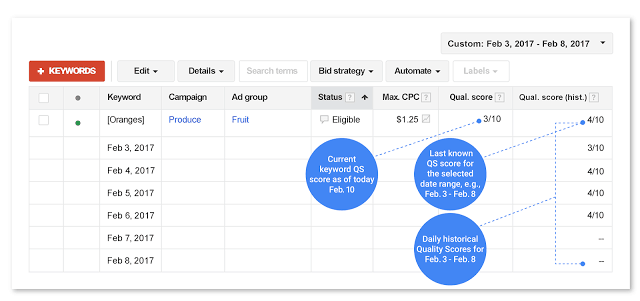
This was a welcome addition for sure and it makes optimising for Quality Scores much easier than they used to be.
Now that you know what Google is looking at when it calculates your Quality Score, you know where to look if your scores are on the low size. Keep track of your Quality Scores across your account and optimise to improve them if they drop below the following:
- 8/10 for branded keywords and SKAGs (aim for 8-10 on these)
- 7/10 for high-intent commercial keywords (aim for 7-10)
- 6-7/10 for low-intent keywords (aim for 7+ where you can)
- 3/10 for competitor keywords (aim for 3+ on these)
Your priority for optimising Quality Scores should be your highest-intent and most profitable keywords. Once you’ve identified scores that are lower than they should be, look into the key factors Google uses to calculate them (CTRs, ad relevance, etc.) and optimise to improve results.
This is one of the most basic but important ongoing optimisation strategy for Google Ads. All of the factors related to this aren’t only important for Quality Scores; they’re also vital to any high-performance Google Ads account so these are factors you should be constantly optimising for regardless.
Consider the benefits of high Quality Scores as an added bonus – one that can make all the difference when you’re trying to edge ahead of the competition.