
Duplicate content is one of the dirtiest words in modern SEO but it’s also one of the most misunderstood. While duplicate content is a genuine SEO challenge that you need to deal with in the right way, it’s not something that’s going to set Google’s alarm bells ringing and get you landed with a search penalty.
In this article, we’re going to explain what duplicate content is, how to check for it on your website and how you should deal with it. Along the way, we’ll be busting a few myths about duplicate content that have been popularised since Google’s first “Panda” algorithm update in 2011.
What is duplicate content and why is it a problem?
Duplicate content is any instance where the same or very similar content is published on more than one page. Google defines duplicate content on Search Console Help as follows:
“Duplicate content generally refers to substantive blocks of content within or across domains that either completely match other content or are appreciably similar. Mostly, this is not deceptive in origin.”
Those last few words are important: “Mostly, this is non deceptive in origin.” In other words, Google doesn’t look at duplicate content and think you’re trying to game the system as it would if you 100% copying content from another page or stuff keywords into your content.
Now, the most important thing to understand at this point is that there’s no search penalty for duplicate content.
As Google’s Susan Moskwa wrote on the Webmaster Central Blog in 2018:
“Let’s put this to bed once and for all, folks: There’s no such thing as a “duplicate content penalty.” At least, not in the way most people mean when they say that.
You can help your fellow webmasters by not perpetuating the myth of duplicate content penalties!”
That being said, duplicate content can damage the performance of the pages involved so this is something you need to optimise for – and we’ll explain how to do this shortly.
How to check for duplicate content
First, though, let’s take a look at how you can check for duplicate content on your website. Sadly, there’s no dedicated duplicate content tool in Google Webmaster Tools or Search Console but there are plenty of third-party options available.

Siteliner and SEO Review Tools are among the many options you have available and there are plenty of plugins for WordPress to help you manage duplicate content from within the WP dashboard.
With Siteliner, for example, you simply type in your website’s URL and it compiles a report of your entire site. Once Siteliner has finished its report, you can see how much duplicate content has been found on your site and click through to see which pieces have been marked as duplicate.
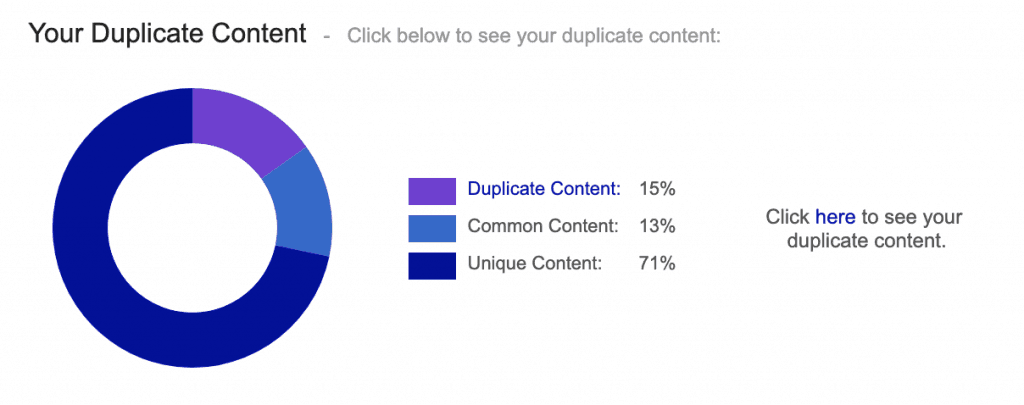
Siteliner also displays a number of other performance metrics, including average page size, average page loading time, number of words per page, internal links per page and plenty more – all of which are compared to the mean average of all Siteliner users.
We’re not affiliated with Siteliner in any way and there are plenty of other tools like this that you can use. We’re just using this particular tool as an example to show you how simple checking for duplicate content can be.
What damage does duplicate content cause?
As we said earlier, there’s no such thing as a duplicate content penalty, unless Google thinks you’re being intentionally malicious. The vast majority of duplicate content happens naturally and former Googler Matt Cutts estimated in 2013 that up to 30% of the entire web’s content in duplicate. This number was backed up a few years later by independent research from Raven Tools, which found 29% of all the content it crawled was considered duplicate.
Google understands this and it’s not about to penalise websites for inevitably having some duplicate content on their sites. In some cases, there are sites that will have far more than 30% duplicate content rates – imagine an eCommerce site with dozens of variations for each product with the same or similar description.
There are only so many ways you can describe the same pair of shoes when the only difference is colour.
There are many scenarios where you might end up with duplicate content:
- You have HTTPS and HTTP URLs
- You have www and non-www URLs
- Your website uses parameters and faceted navigation
- Using session IDs
- Trailing slashes
- Index pages
- Alternate page versions such as mobile pages, AMP pages or printer-friendly pages
- Dev/hosting environments
- Pagination
- Location/language versions
All of these are perfectly valid reasons to have duplicate content and you don’t need to beat yourself up about it.
Just as Google says, most duplicate content “is not deceptive in origin” but the search giant only wants to show one version of content where any duplicates are found. This is to prevent results pages being filled with the multiple versions of the same page – perfectly understandable.
The key thing is to make sure you tell Google which version of any duplicate content to show. Google is already pretty good at doing this without your help and the worst result of having duplicate content will be Google indexing the wrong version.
That’s as much damage as duplicate content will cause and it’s relatively easy to avoid this.
How to deal with duplicate content
There are various ways to deal with duplicate content and the first one is to use canonical tags, which is the solution you’ll probably be using most often. However, there are other methods that serve more specific purposes and we’ll also be explaining those.
- Canonical tags: By placing canonical tags on your preferred page, you’re telling Google that this is the version you want to rank above all others. When you know you’ve got duplicate content on your hands, simply add these tags to the page of your choice and Google will consolidate the signals from each version and only show the page you’ve marked up with canonical tags.
- Rel=“alternate”: This is the route to take if you have alternate versions of the same page, such as mobile and desktop or different versions for users based on their location/language.
- 301 redirects: Use these when you want to move a page to a different URL.
- Rel=“prev” and rel=“next”: Use these for pagination.
- Tell Google how to handle URL parameters: This will allow the search giant what your search parameters are actually doing and help it determine which version of your page to show in results pages.
As you can see, the best solution for duplicate content depends on the reason you’ve got it on your hands in the first place. The key takeaway from this article, though, is that it’s perfectly natural to have some duplicate content on your website and you’re not going to get blasted by a search penalty because of it.
All it takes is some technical SEO to inform Google which version of your page to show in the SERPs and everything is good.